
HTTPS 란?
HTTP에 보안을 더한 통신 프로토콜로 웹사이트와 사용자 브라우저 간에 데이터를 암호화하여 전송함으로써 도청·변조·위조를 방지하는 것
비밀번호나 신용카드 번호 등의 정보가 공격자에 의해 도용되는 경우를 방지하려면 HTTPS 설정이 필수이다.
HTTPS 작동 방식은 다음과 같다.
- 브라우저가 웹 서버에 접속 요청 (https://example.com)
- 서버는 SSL 인증서를 브라우저에 전달
- 브라우저는 인증서를 검증
- 브라우저와 서버는 비밀키 공유용 암호키 교환
- 이후 모든 통신은 암호화되어 안전하게 전송
SSL 인증서 : 웹사이트가 HTTPS 통신을 하기 위해 필요한 신원 확인서이자 암호화 도구
Certbot
Let's Encrypt 에서 제공하는 무료 SSL 인증서를 자동으로 발급받고 갱신해주는 오픈소스 도구로,
웹 서버(Nginx, Apache 등)에 HTTPS를 쉽게 적용하고 자동 갱신까지 도와주는 프로그램이다.
Let's Encrypt : 무료로 SSL/TLS 인증서를 발급해주는 인증기관
Linux 서버, Nginx 기준으로 Certbot을 snap 패키지로 설치했다. (참고 문서)
# Certbot 설치
$ sudo snap install --classic certbot
# Certbot 명령어 경로 설정
$ sudo ln -s /snap/bin/certbot /usr/bin/certbot
Let’s Encrypt 인증서는 유효기간이 90일이기 때문에 자동 갱신 설정이 매우 중요하다.
Snap으로 설치한 Certbot은 기본적으로 systemd 타이머를 통해 자동 갱신이 활성화되어 있다.
다만, 실제로 정상 작동하는지 테스트해보는 것이 좋다.
# simulated renewal succeeded 메시지가 출력된다면 자동 갱신 설정이 정상적으로 작동하고 있다는 뜻이다.
$ sudo certbot renew --dry-run
HTTPS 인증서 발급
Certbot은 서버별 플러그인을 제공한다. 그 중 Nginx 플러그인을 사용하여 인증서를 발급 받고 설정을 자동화 해보자
$ sudo certbot --nginx -d <도메인 주소>참고 문서에서도 설명하듯, 위 명령어는 인증서 발급과 함께 Nginx 설정을 자동으로 수정해 HTTPS를 즉시 적용해준다. 즉, Certbot 명령어 한 줄로 HTTPS 설정을 간편하게 완료할 수 있다.
Nginx 플러그인을 사용하지 않을 경우에는 certonly 옵션을 사용하여 인증서만 발급받고 Nginx 설정을 직접 수정할 수 있다.
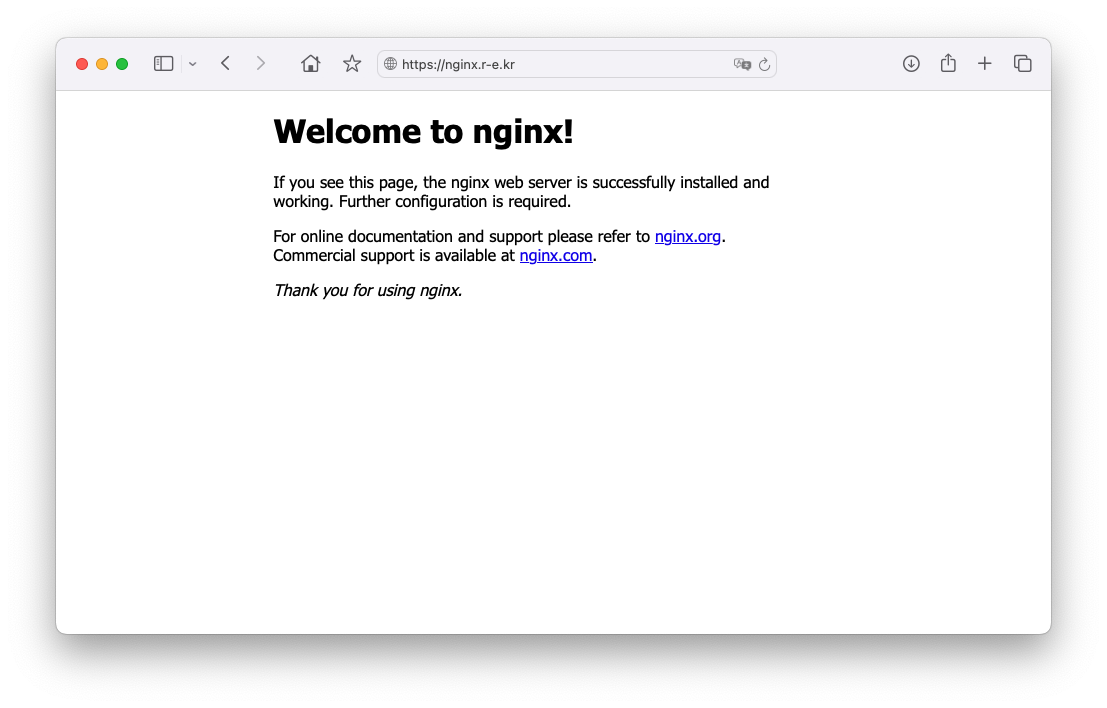
HTTPS 적용 확인
- HTTP 주소로 접속해도 자동으로 HTTPS로 리다이렉트 된다.
- 브라우저에서도 보안 연결이 정상적으로 적용된 것을 확인할 수 있다.
Nginx, Certbot 설정 해석
Certbot 명령어 한 줄로 HTTPS가 적용되었지만, 실제로 어떤 설정이 바뀐 걸까?
Nginx 설정 파일 /etc/nginx/conf.d/default.conf 또는 도메인 별 설정 파일이 위치한 곳에서 확인할 수 있다.
Certbot이 수정한 설정 코드를 전부 하나씩 분석할 필요는 없지만 대략적으로 어떤 의미를 담고 있는지 이해하고 넘어가는 건 중요하다.
# default.conf 설정 파일에서 Nginx와 Certbot이 작성한 코드를 살펴보자
$ sudo vi /etc/nginx/conf.d/default.conf
default.conf 설정 파일
# HTTPS 설정 (443 포트) - nginx.r-e.kr 도메인 처리
server {
    server_name  nginx.r-e.kr;

    location / {
        root   /usr/share/nginx/html;
        index  index.html index.htm;
    }

    error_page   500 502 503 504  /50x.html;
    location = /50x.html {
		root   /usr/share/nginx/html;
    }

    # HTTPS 리스닝 및 SSL 인증서 적용
    listen 443 ssl; # managed by Certbot
    ssl_certificate /etc/letsencrypt/live/nginx.r-e.kr/fullchain.pem; # managed by Certbot
    ssl_certificate_key /etc/letsencrypt/live/nginx.r-e.kr/privkey.pem; # managed by Certbot
    include /etc/letsencrypt/options-ssl-nginx.conf; # managed by Certbot
    ssl_dhparam /etc/letsencrypt/ssl-dhparams.pem; # managed by Certbot

}

# HTTPS 설정 (443 포트) - admin.nginx.r-e.kr 도메인 처리
server {
    server_name admin.nginx.r-e.kr;

    location / {
        root   /usr/share/nginx/html;
        index  index.html index.htm;
    }

    error_page   500 502 503 504  /50x.html;
    location = /50x.html {
        root   /usr/share/nginx/html;
    }

    # HTTPS 리스닝 및 SSL 인증서 적용
    listen 443 ssl; # managed by Certbot
    ssl_certificate /etc/letsencrypt/live/admin.nginx.r-e.kr/fullchain.pem; # managed by Certbot
    ssl_certificate_key /etc/letsencrypt/live/admin.nginx.r-e.kr/privkey.pem; # managed by Certbot
    include /etc/letsencrypt/options-ssl-nginx.conf; # managed by Certbot
    ssl_dhparam /etc/letsencrypt/ssl-dhparams.pem; # managed by Certbot

}

# HTTP → HTTPS 리다이렉트 설정 - nginx.r-e.kr
server {
    if ($host = nginx.r-e.kr) {
        return 301 https://$host$request_uri;
    } # managed by Certbot


    listen       80;
    server_name  nginx.r-e.kr;
    return 404; # managed by Certbot


}

# HTTP → HTTPS 리다이렉트 설정 - admin.nginx.r-e.kr
server {
    if ($host = admin.nginx.r-e.kr) {
        return 301 https://$host$request_uri;
    } # managed by Certbot


        listen 80;
        server_name admin.nginx.r-e.kr;
    return 404; # managed by Certbot


}
요약
- listen 443 ssl 블록: HTTPS 요청을 처리하고, 인증서 및 보안 설정을 적용하는 메인 서버 블록이다.
- listen 80 블록: HTTP로 들어오는 요청을 받아 HTTPS로 리다이렉트하는 역할을 한다.
- return 301 https://$host$request_uri: 영구 리다이렉트(301 Redirect) 를 의미하며, 검색 엔진에도 HTTPS 주소를 기준으로 인식되도록 한다.
- include /etc/letsencrypt/...: Certbot이 자동으로 삽입한 SSL 관련 기본 보안 설정 옵션을 불러온다.
위와 같은 설정 덕분에 브라우저에서 http://나 https://를 명시적으로 입력하지 않아도, 혹은 HTTP로 요청을 보내더라도 자동으로 HTTPS로 리다이렉트되어 보안 연결이 자연스럽게 적용되는 것이다.
'Study Notes > Nginx' 카테고리의 다른 글
| [Nginx] Nginx를 로드 밸런서로 사용하기 (2) | 2025.08.01 |
|---|---|
| [Nginx] Nginx 리버스 프록시 서버 구축 (0) | 2025.08.01 |
| [Nginx] Nginx 멀티 도메인 배포 (1) | 2025.07.29 |
| [Nginx] Nginx 기본 문법 해석하기 (2) | 2025.07.27 |
| [Nginx] Nginx 설치 및 실행하기 (4) | 2025.07.25 |